Analysis and tasting
Open the recipe's Analysis tab on tasting day. It puts everything about the beer on one page: what it cost, what went in, how close it came to its targets, the process notes and the hop oil charts. You can print it.
10.1Your tasting notes
These notes are the beer's own write-up, shared by everyone: everyone sees and adds to the same notes. Use your phone or computer.
- Appearance, aroma, flavor, mouthfeel and overall impression.
- Summary: your overall summary of the beer.
- Changes for next time. These are the Previous notes you see on the Ingredients tab when you brew it again.
- Brew again: each taster answers yes, no or maybe in their tasting (see tasting panel). Here you see the count, and beside it the Final decision: the brewery's own yes, no or maybe. The final decision is what shows in the recipe list. Example: two of five tasters say yes, one says no and two say maybe. You talk it over and set the final decision to Maybe.
If you use the Sales Hub, it gets these notes, so the sales team can write the sales sheet from them. It gets appearance, aroma, flavor, mouthfeel and overall impression, and each person's tasting. The summary goes only when overall impression is empty. Changes for next time stays in Hakkotome. The screen says this too.
- Brewer's notes: a note from whoever made the recipe for the sales team: the story of the beer, for their email or sales sheet.
- Analysis notes: anything extra from the lab.
10.2Tasting panel
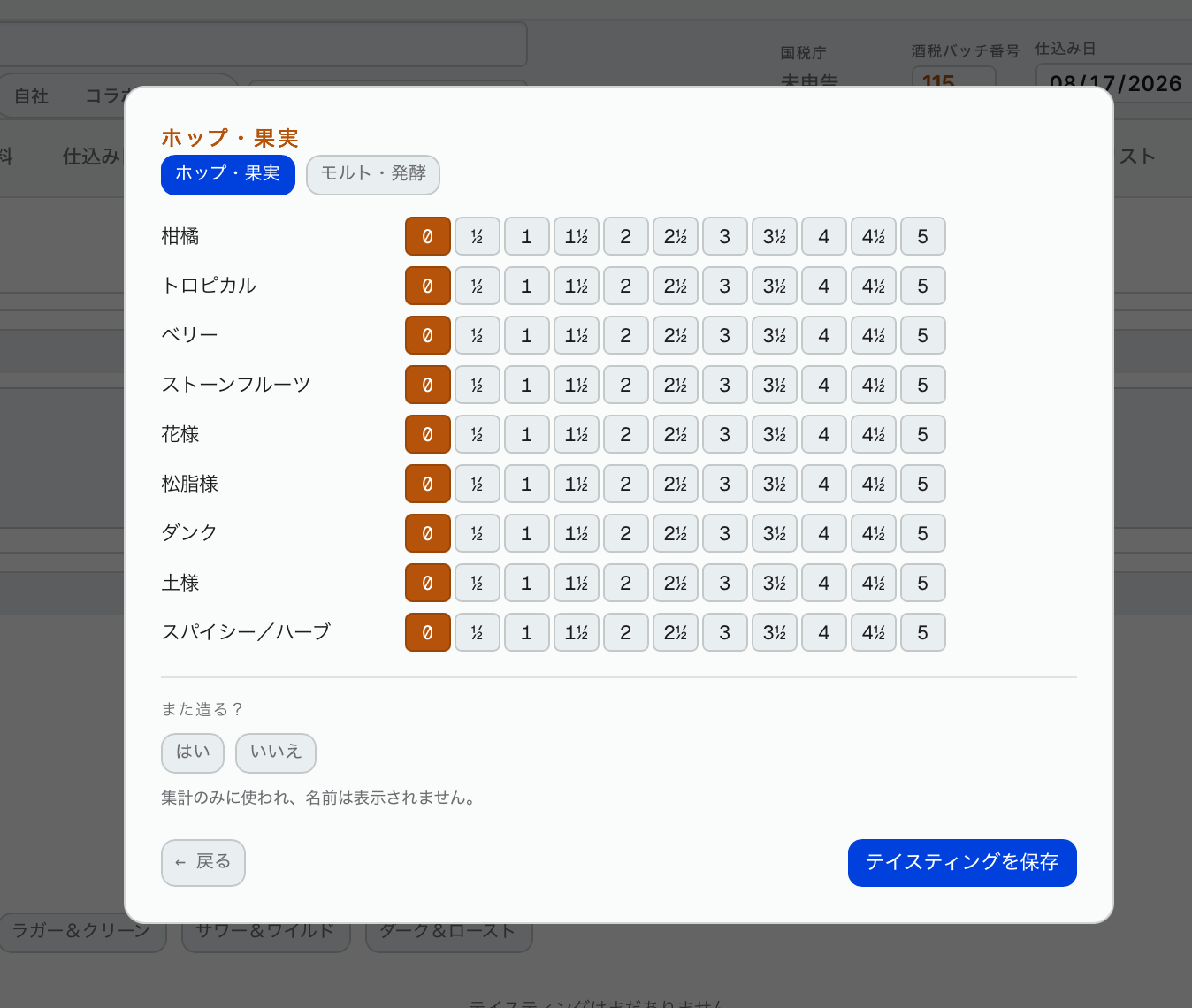
This is the most important part.
- Put your overall score (out of 5) and bitterness (1–5).
- There are five tasting wheels. Pick the ones that suit this beer. Example: hop and fruit for a hazy; malt and fermentation for most beers. On tasting day everyone together picks which ones to fill in.
- Press Add tasting. Your name and today's date are filled in for you (change them if they're wrong). Each person adds one tasting per beer: if your name already has a tasting on this beer, Hakkotome won't save a second one.
- Press Start tasting. Only the wheels you picked show. Press one and score each flavor from 1 to 5, in half points.
- Answer Brew again?: yes, no or maybe. Your name isn't shown against it; the Analysis tab only shows how many said each.
Fill in every square. Anything left blank counts as zero.
It then draws a spider graph of the flavors. Everyone's tasting cards are shown to everyone. On the Sales Hub's release page, the team sees the average of everyone's.
Tasting on paper: if you'd rather, print the tasting card and fill it in by hand on tasting day, then enter it later. One person can enter everyone's, but we recommend each person enters their own. The spider graph's labels are spaced so they don't overlap.