Built by brewers,
for brewers.
Recipes, brew days, tanks, ingredients and liquor tax records, all in one place, on the computer and on the brew floor. With schedules, calendars, and tasks assigned to each person on the team.
Made in a working Japanese craft brewery, and used there every day.
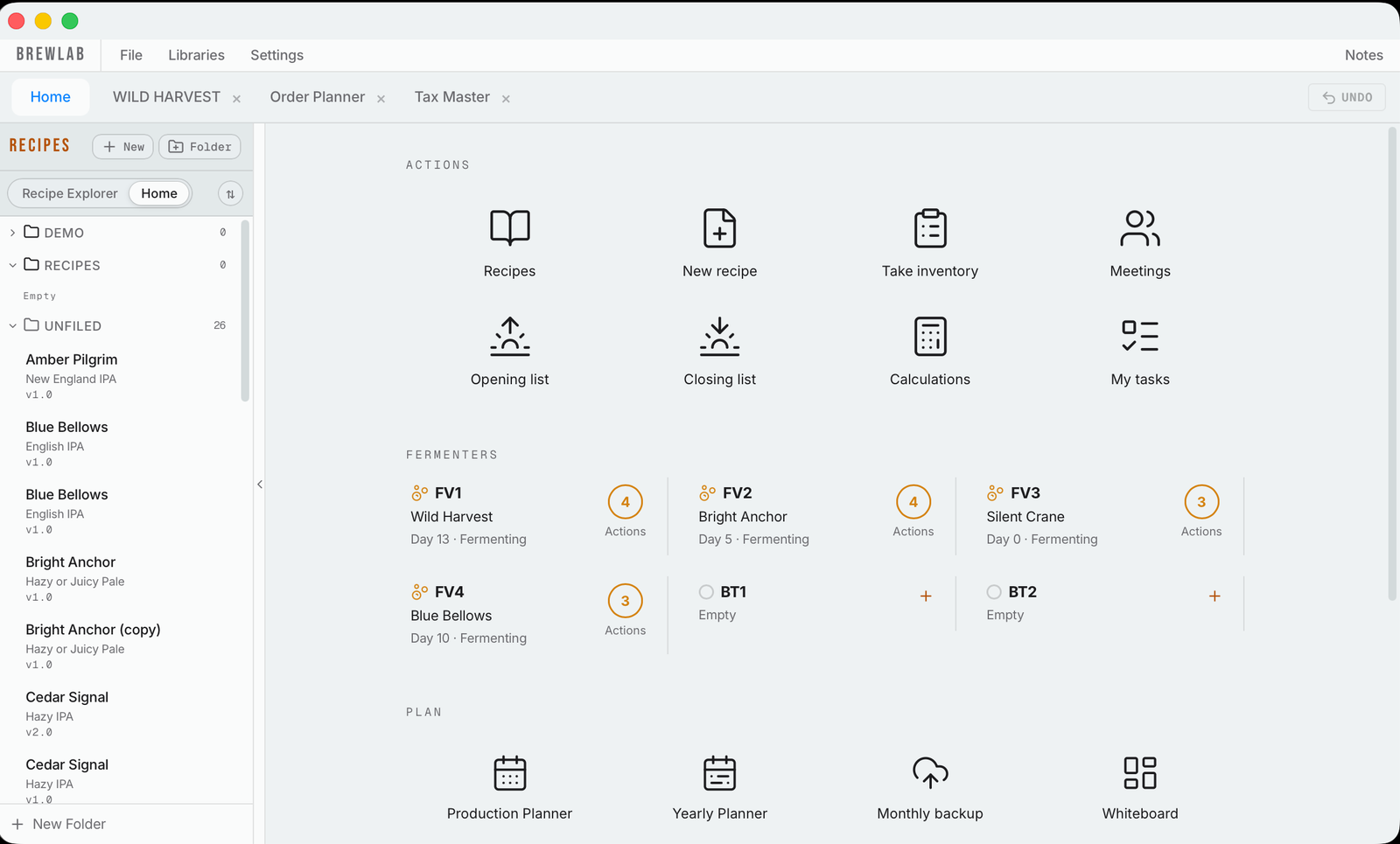
What sets it apart.
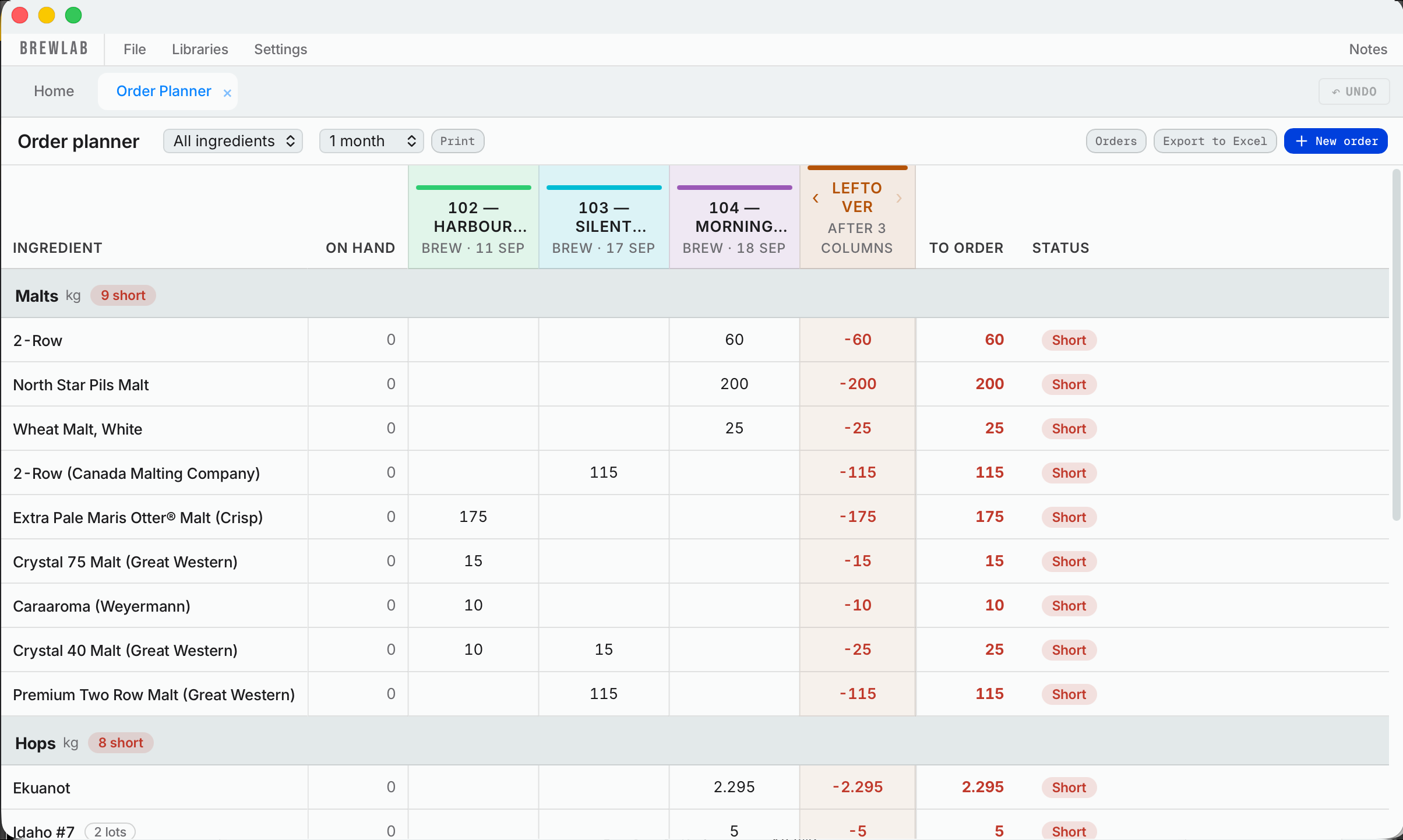
Orders that write themselves
It reads your upcoming brews and your current stock, works out what you'll run short of, and makes the order list for you, already grouped by supplier.
- Tick a delivery when it arrives and it's in your tax inventory
- Receive deliveries on your phone at the dock, with the lot number
- Hop lot numbers carried into each recipe
Brewing math you won't find elsewhere
The sums brewers usually work out on a scrap of paper, done for you from the recipe.
- Dip hops: what temperature the rest of the wort needs to be to land on your pitching temperature
- How much a dry hop raises the pH, and the acid to bring it back
- A “dry hop soon” alert at the °P you choose
- A yeast cell counter: from your counting-chamber counts to cells per mL, viability, and how much slurry to pitch
For the unexpected on brew day
When the gravity or the amounts don't come out as planned, the calculator is right there, on the computer or the phone, with the beer's own numbers already filled in.
- Liquor back, short on gravity, sugar additions and mash temperature fixes
- Hydrometer and refractometer corrections
- A unit converter for recipes and research from overseas
Japanese tax and law, built in
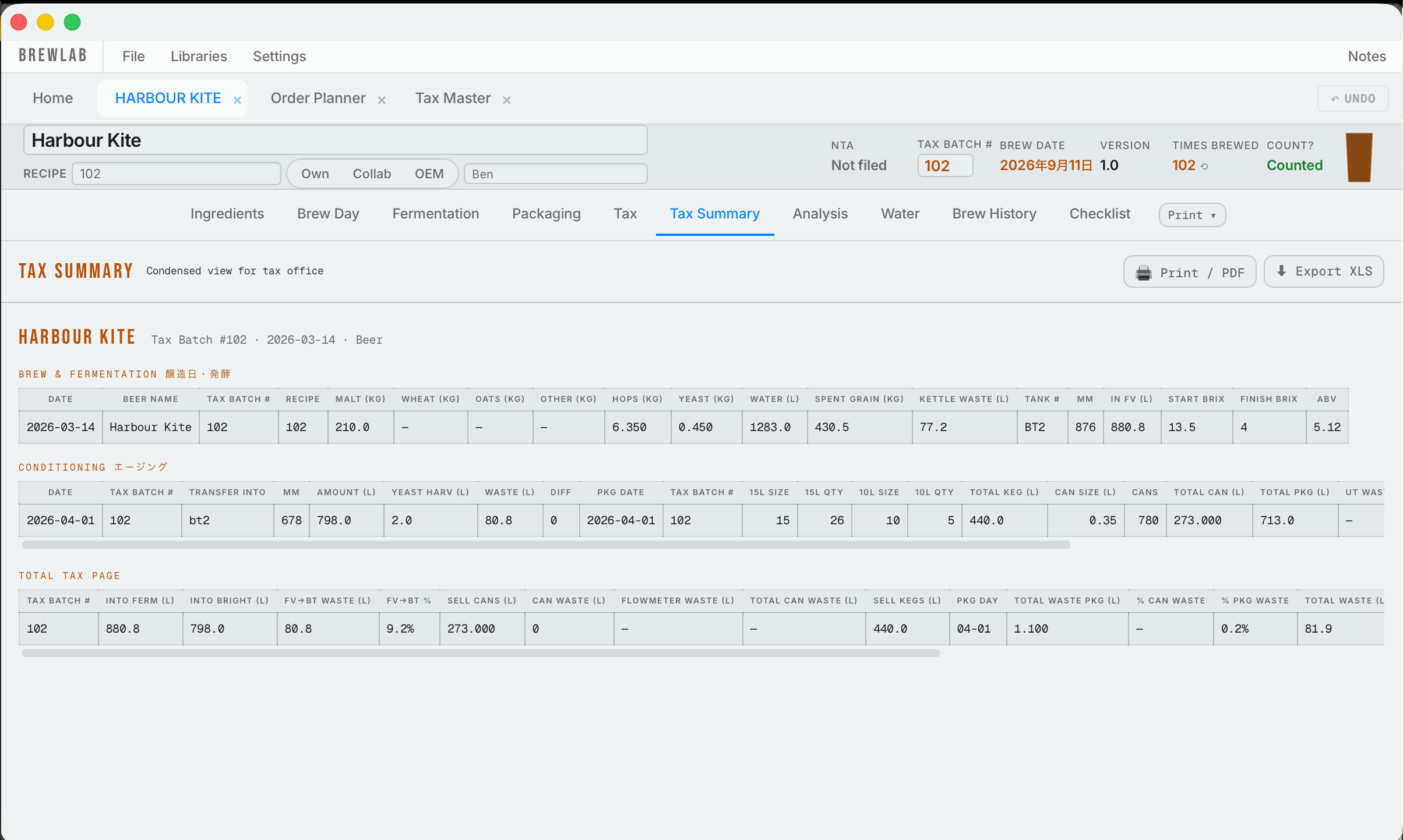
What you brew and package goes straight into your 酒税 (liquor tax) records, so tax month means checking the numbers instead of rebuilding them.
- Beer or happoshu worked out from the ingredients, with the actual law linked so you can check it yourself
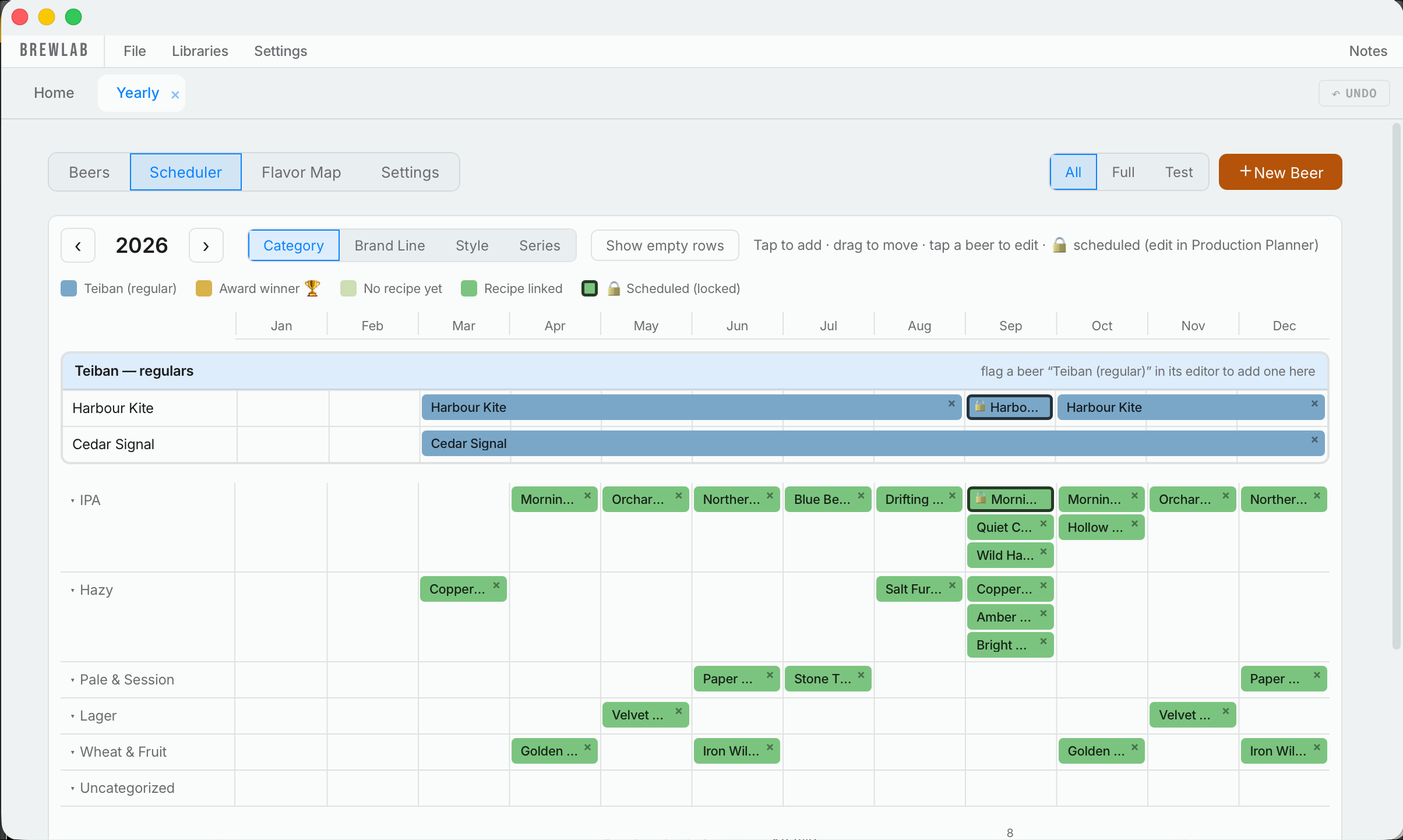
- Your year of production planned month by month, with views for your own beers, collabs and OEMs
- HACCP records built in, not bolted on
- Malt tariff quota form, built from your records
From beer idea to cost per liter
Write a beer down before there's a recipe, plan it into the year, and once it's brewed, see what it cost.
- Beer ideas kept before the recipe exists, linked to their brand line
- The full cost of every beer worked out for you, and its price per liter
- Coming soon: price per package
The small things that add up.
Recipes that do the math
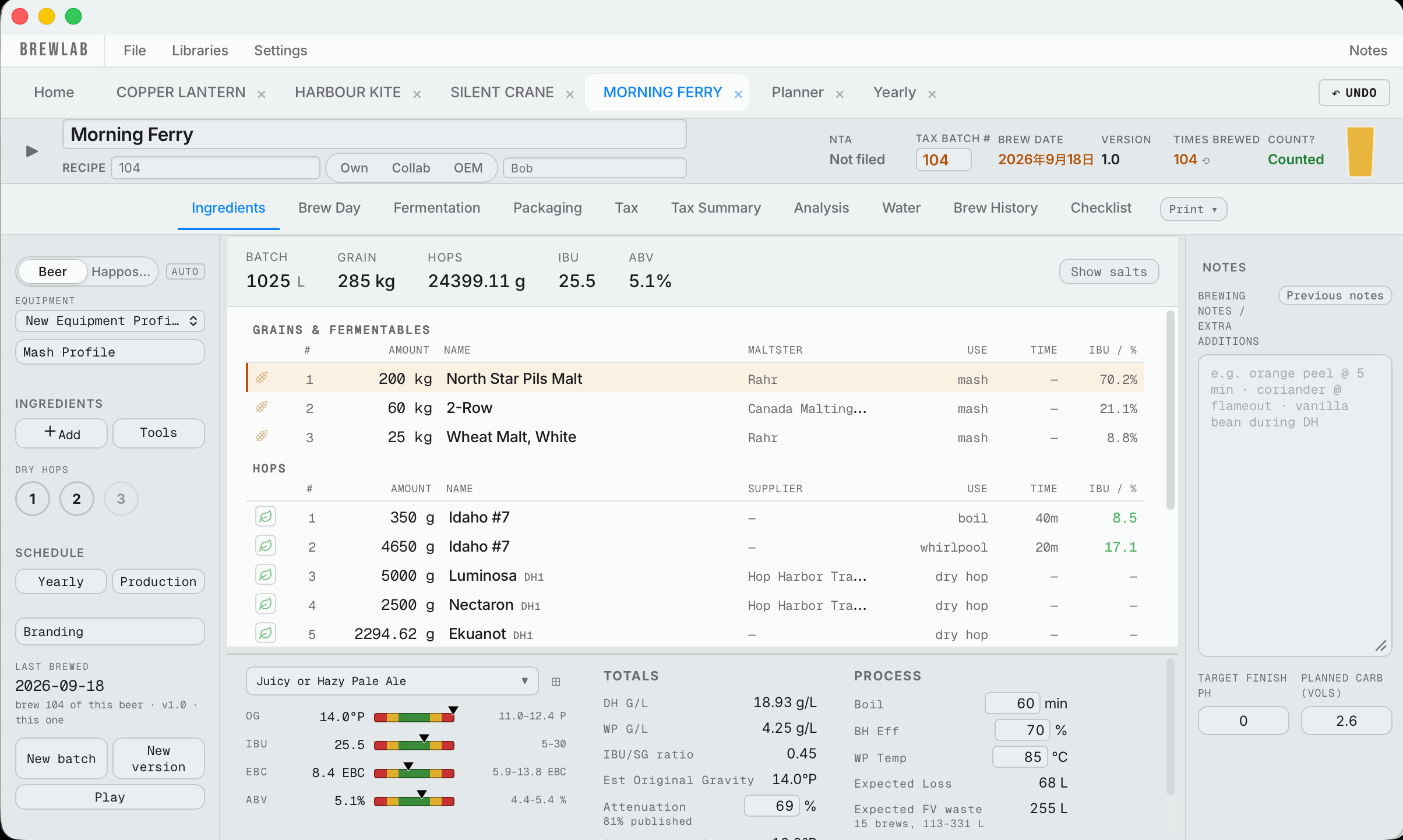
Build a recipe and it works out gravity, bitterness, color and ABV as you go, with water and mash included. Brew history keeps every batch you've made and every version of the recipe, so you can see what you changed and why.
Your whole team
Each person signs in with their own PIN and ticks checklists under their own name, so managers can see who did what.
Every tank, weeks ahead
Every brew in your fermenters and bright tanks, with its dry hop, crash and transfer days, and a yearly planner so the seasonal beers are never forgotten.
Yeast you can follow
Harvest into jars and follow each strain generation by generation, with its viability and attenuation on a chart.
On the brew floor
Brew-day numbers, readings at the tank, and the opening and closing checklists, on your phone.
Templates locked to their tax name
A template is saved once under its tax name and can't be edited, so what you declared and what you brew never drift apart.
Any device
Computer, tablet or phone.
Complete the set.
Connect your brewery with your sales team and your crew. The Sales Hub handles beer releases, events and sales trips. The Team Hub is where everyone talks and plans. Both read straight from Hakkotome, so nothing is typed twice.
Recipes that do the math
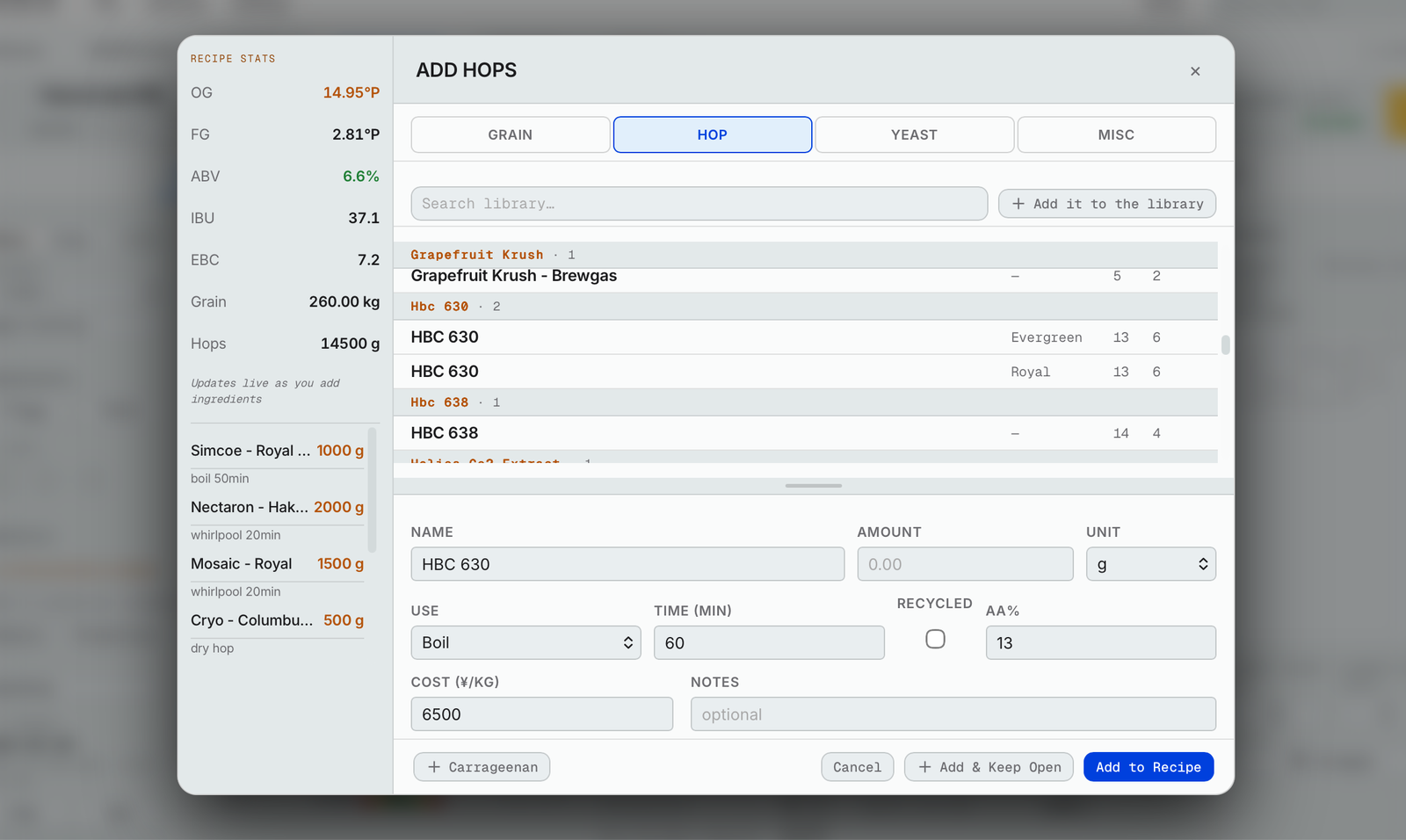
Build a recipe
- Gravity, bitterness, color and ABV worked out as you add each ingredient.
- Bars that show whether each number sits inside the style's range.
- Your brewhouse profile fills in, and your saved mash, water and pitch profiles are one click away.
- Each recipe carries its tax ID, tax batch number, version and how many times you've brewed it.
- Mark each beer as your own, a collab or an OEM, and who it's for.
- Brand lines, series and tags to keep your beers organized.
Mash and water
- Step mashes, decoctions and cereal mashes, with the amounts and temperatures worked out.
- Say the water you want and it tells you which salts to add, for the mash and the sparge.
- Estimated mash pH, and how much acid to reach your target.
- A longer boil keeps the beer the same; it just starts with more water.
Hops
- Dip hops: the temperature the rest of the wort has to be to land on pitching temperature.
- Up to three dry hops, each set to go in at final gravity or a set number of °P before it, with a “dry hop soon” alert.
- Hop oils shown stage by stage, by percent or by the real amount.
- Whirlpool bitterness adjusted for temperature.
Yeast
- Cells needed, cells you have, and how far over or under you are.
- A yeast cell counter: your counting-chamber counts become cells per mL, viability, and how much slurry to pitch.
- Harvest into jars (J1, J2…). Pitching empties the jar, and a jar that's still full can't take a new harvest.
- A chart of each strain, jar by jar: viability, attenuation and liters harvested, generation by generation.
- It won't let you pitch yeast from a happoshu into a beer.
Tools
- Scale to a new batch size.
- Set the grain bill by percent.
- Aim for a different strength and the grain follows, at the same percentages.
- Type the IBU you want from a hop and it works out the amount.
Brewing it again
- Templates, so a new beer starts with everything already set up: the grain bill, the mash, the water and the tax name.
- A template is saved once under its tax name and never edited, so what you declared and what you brew can't drift apart.
- A new batch, or a new version with a note on what changed.
- Play copies: try changes without touching the real recipe.
- Brew history: every time you've brewed it, and what changed in each version.
- A duplicated recipe says which beer it was copied from.
Your recipe list
- Folders inside folders.
- Search by name or by ingredient: type a hop and see every beer that used it.
- Filter by style, or by own, collab and OEM, and choose your columns.
- Recipes other breweries have shared, and share your own.
Print and save
- Prep sheet, brew day sheet, and fermentation and packaging sheet, or all three at once.
- Save each beer to a folder in your Google Drive, or download it.
From brew day to close-out
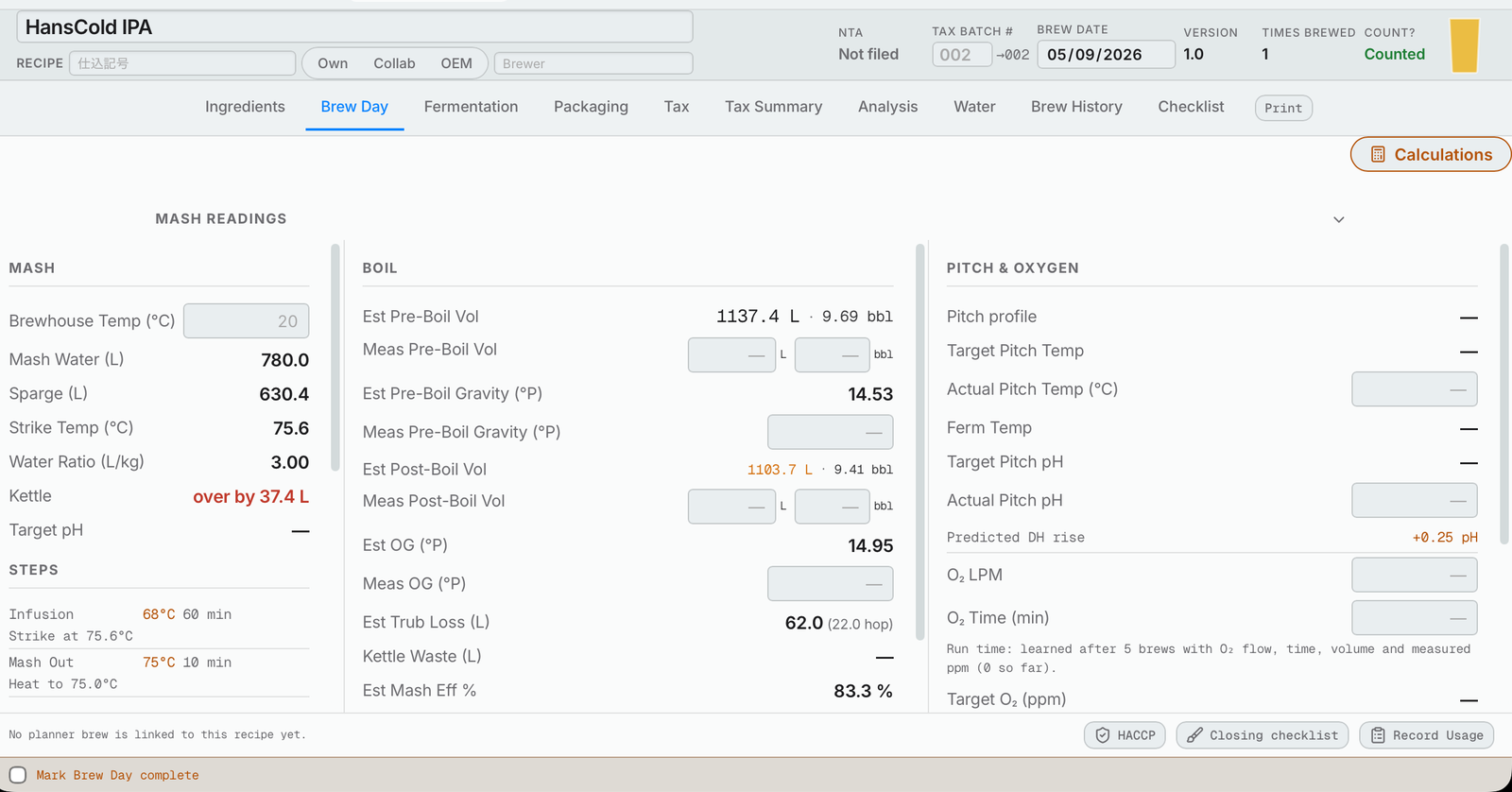
Brew day
- Mash readings, the water amounts, and what you actually did.
- Estimated versus measured volumes and gravities, and your efficiencies.
- Oxygen: after five brews, it tells you how long to run to hit your target.
- The dipstick reading in millimeters becomes liters from your tank setup.
- Record usage takes the ingredients out of stock and the tax ledger. You pick the lot; nothing to type.
- Calculations for the unexpected, at the top of Brew Day: liquor back, short on gravity, sugar additions, mash temperature, hydrometer and refractometer corrections, and the yeast cell counter, with the beer's numbers already filled in.
- A unit converter for recipes and research from overseas: pounds, gallons, °F and more.
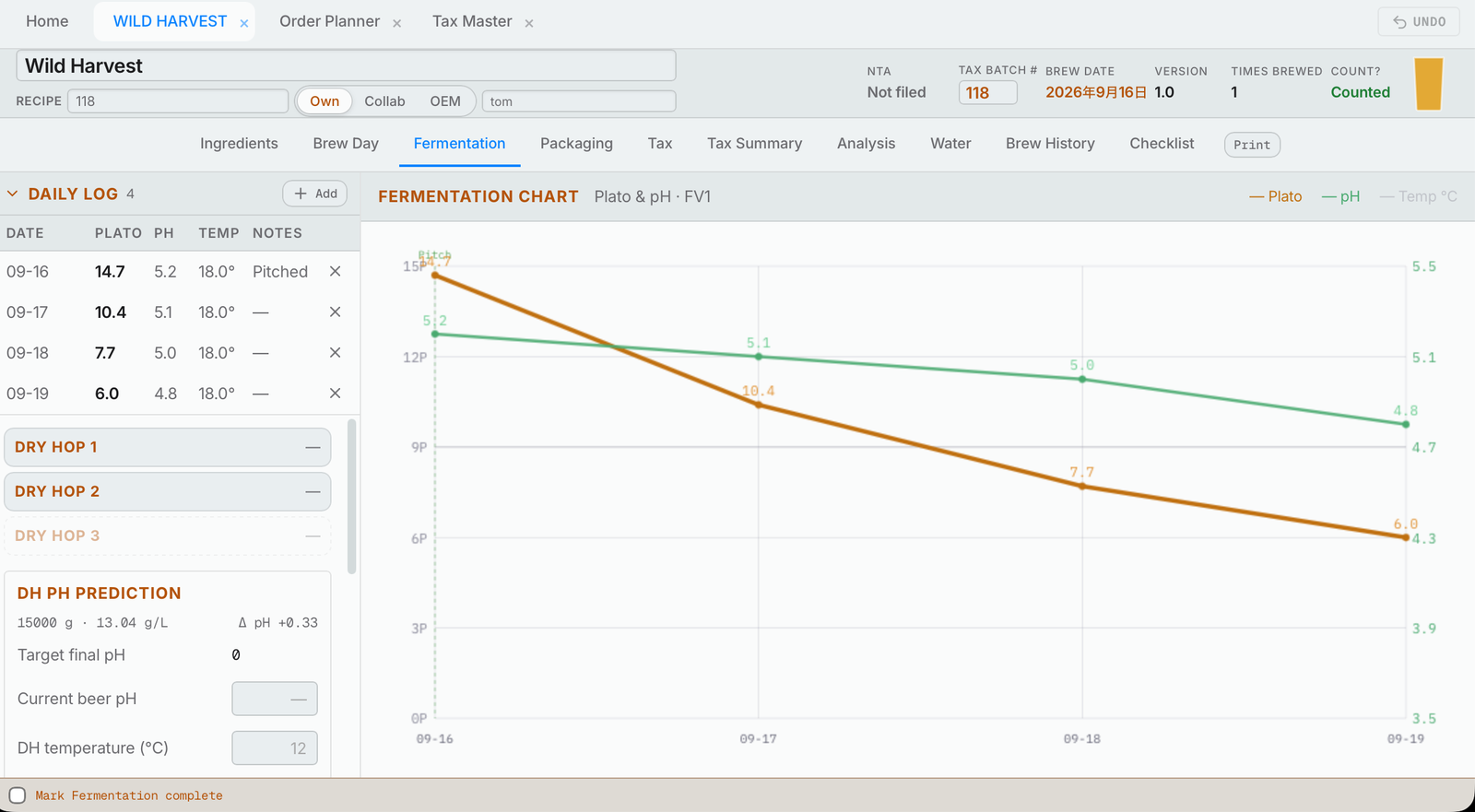
Fermentation
- A daily log of gravity, pH and temperature, drawn as a chart.
- Dry hops recorded as they go in; a short one can carry over to the next.
- Dry hop pH: how much acid brings it back to your target.
- Harvested yeast goes straight into inventory.
Packaging
- Transfer, final gravity and pH, carbonation and dissolved oxygen.
- Cans and kegs by size, and the liters you have to sell.
- Canning and kegging waste added up for you.
- A label check sheet for every container.
- Seam checks, can weights and the bacteria test, on the same tab.
Tasting and analysis
- Everything about the beer on one page: its full cost worked out for you, in total and per liter, what went in, and how close it came to its targets.
- Coming soon: price per package.
- Five tasting wheels, a spider graph of each person's scores, and the average for the sales team.
- Each taster answers “brew it again?”; the brewery makes the final call.
- Notes for next time show up when you brew it again.
- Print a tasting card for tasting on paper.
Close out
- A checklist of every stage; “Go” takes you to what's missing.
- Complete and archive: the beer comes off every list, with all its paperwork done.
See every tank, weeks ahead
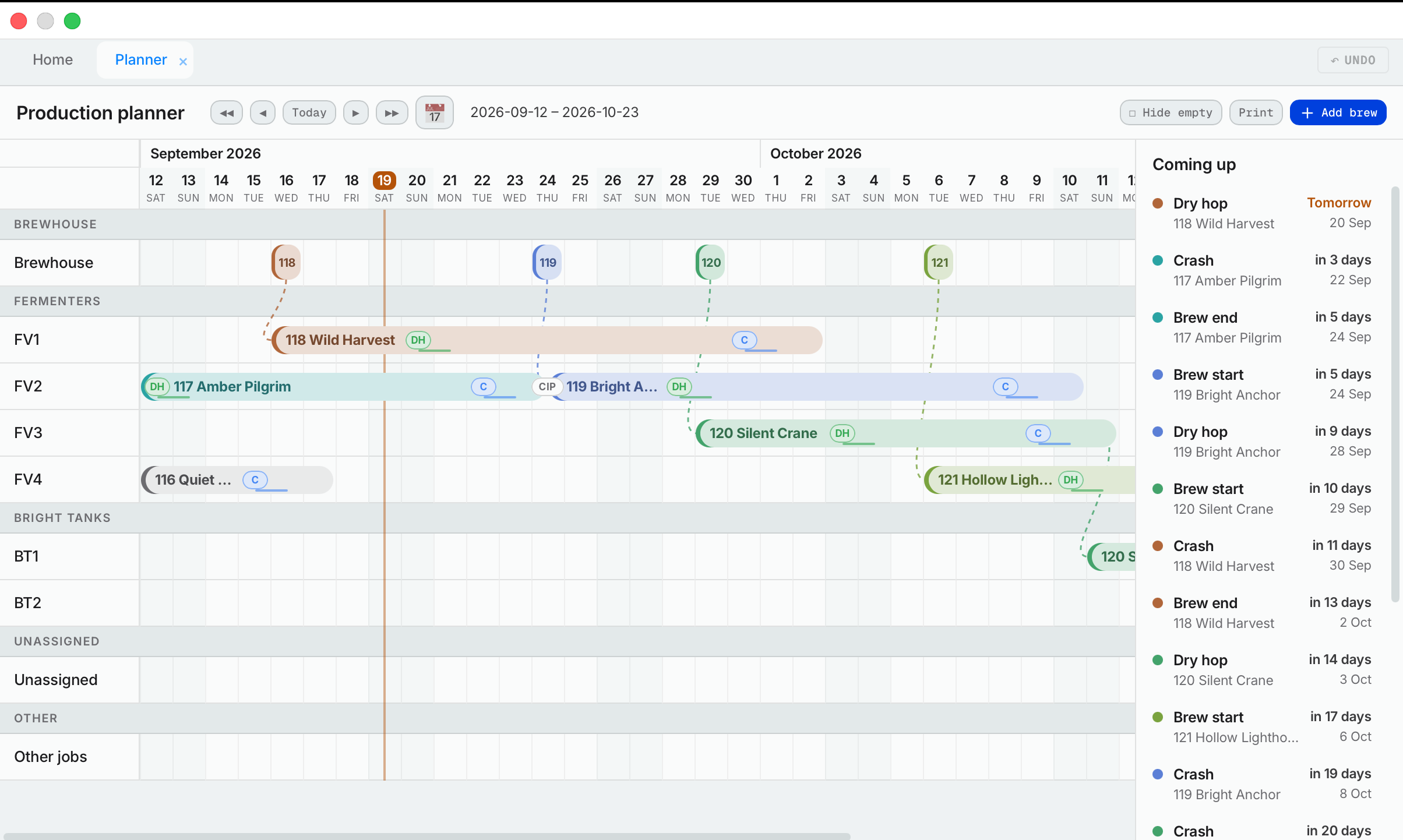
Production schedule
- Every brew in every fermenter and bright tank, weeks ahead and back.
- Dry hops, cold crashes, transfers and your own jobs, each assignable to a person.
- Warns you when a tank is already booked.
- Other jobs, like keg washing, on the same schedule.
- Print one or two months for the wall.
Yearly planner
- Every beer you make, and every beer you want to make, month by month.
- Beer ideas kept before there's a recipe, linked to their brand line.
- Views for your own beers, collabs and OEMs.
- Core beers, award winners and test batches at a glance.
- Connect a beer to a holiday, so the seasonal ones are never forgotten.
- A flavor map of your beers, from bitter to not and light to full.
- Anyone can suggest a beer for a month.
- Shares its brand line, series and tags with the recipe.
Whiteboard
- Every fermenter, the brewhouse and the canning machine: what needs doing and what's done.
- Assign any job with a click; see every unassigned job together.
- Recurring jobs, and who did them last.
- Each person's list, to spread the work fairly.
Your tasks and calendars
- Your jobs from the brewery and the Sales Hub, and your personal tasks, on one list.
- Tick it done, and undo if you tapped by mistake.
- Calendars for the brewery and for each person, for Google, Apple or Outlook, that update on their own.
Meetings
- The agenda fills itself in: what carried over, and what's been and is being brewed and packaged.
- Every person has their own section.
- Each item keeps everything said about it, meeting after meeting.
- Turn an item into a task, or send it to the combined meeting with the sales team.
- Minutes for every meeting, and search across all of them.
Know what to order, and from whom
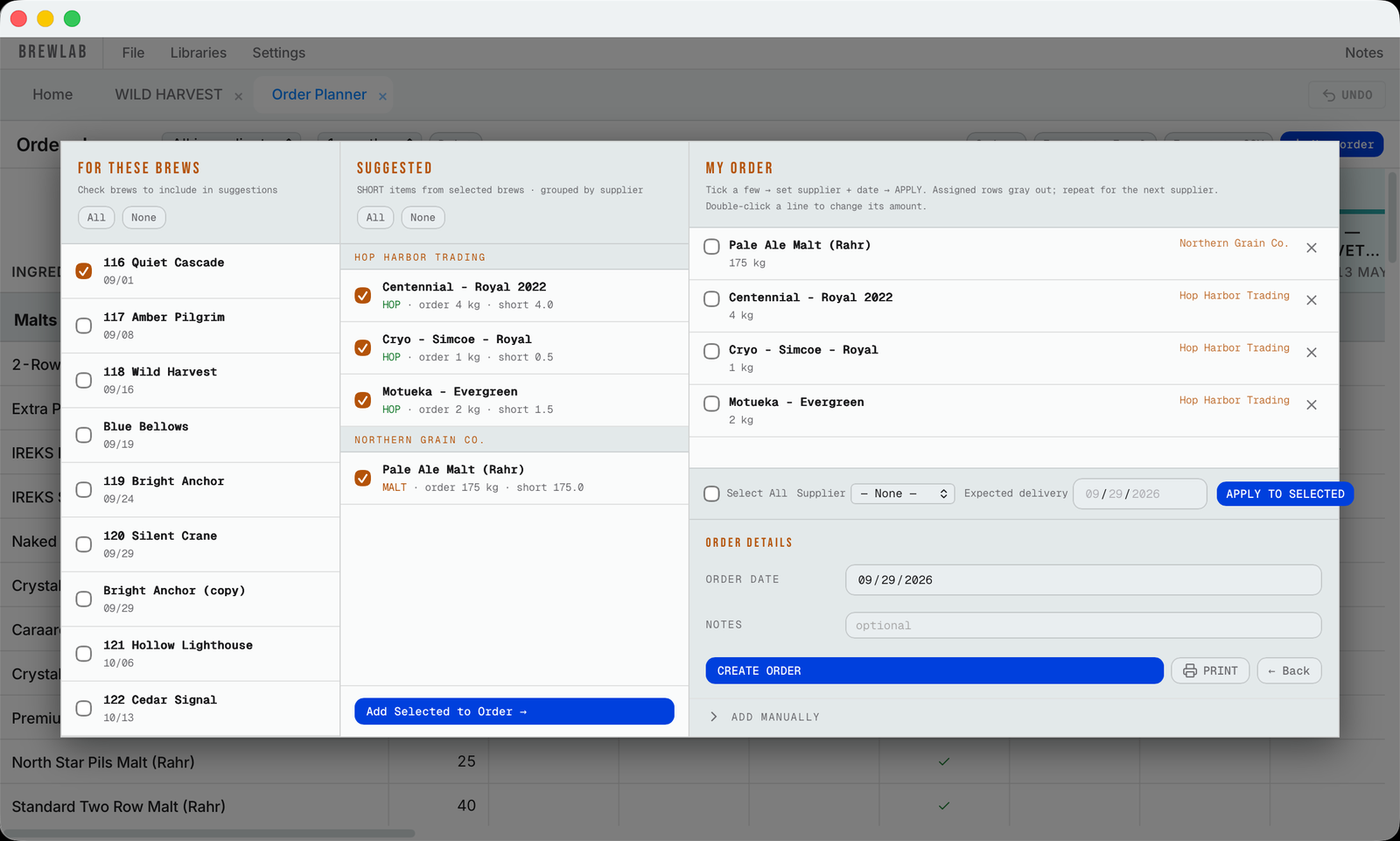
Order planner
- Put a beer on the schedule and its ingredients go on the order planner by themselves.
- What you have, what each brew will use, and what you'll have left after any brew or delivery.
- Pick the beers and it suggests what to order, grouped by supplier.
- Print the order sheet, and every delivery goes on the calendar.
- Recurring orders for anything you buy on a schedule.
Deliveries
- Tick what came in and it's in your inventory.
- Or receive it at the dock on your phone, with the lot number.
- Lots typed once on delivery, then picked (never typed) when you use them.
Inventory
- Take inventory: type your count and see the difference.
- Print a count sheet to take into the cooler.
- Apply the correction and it goes on your tax records.
- A tax ledger for every ingredient: every delivery, every brew, every correction.
- Export to Excel or CSV.
Libraries and packs
- Fermentables, hops, yeast and misc, each with prices, origin and supplier.
- Install ready-made packs of ingredients and profiles to start with.
- Bring your whole library in from BeerSmith or any BeerXML file.
- Share your own packs with other breweries.
Liquor tax records that fill themselves in
Beer or happoshu
- Decided for you from the ingredients: a happoshu ingredient, too much fruit or spice, or too little malt.
- The law is linked right beside the choice (the National Tax Agency's guide and the regulation itself), so you can check it yourself.
- Set it by hand if you know better, and it shows that you did.
Declaring recipes
- Your recipe scaled to the size you declare at.
- Checks it against everything you've already declared, so you don't declare the same beer twice.
- Prints the submission form, and keeps a register of every name you've declared.
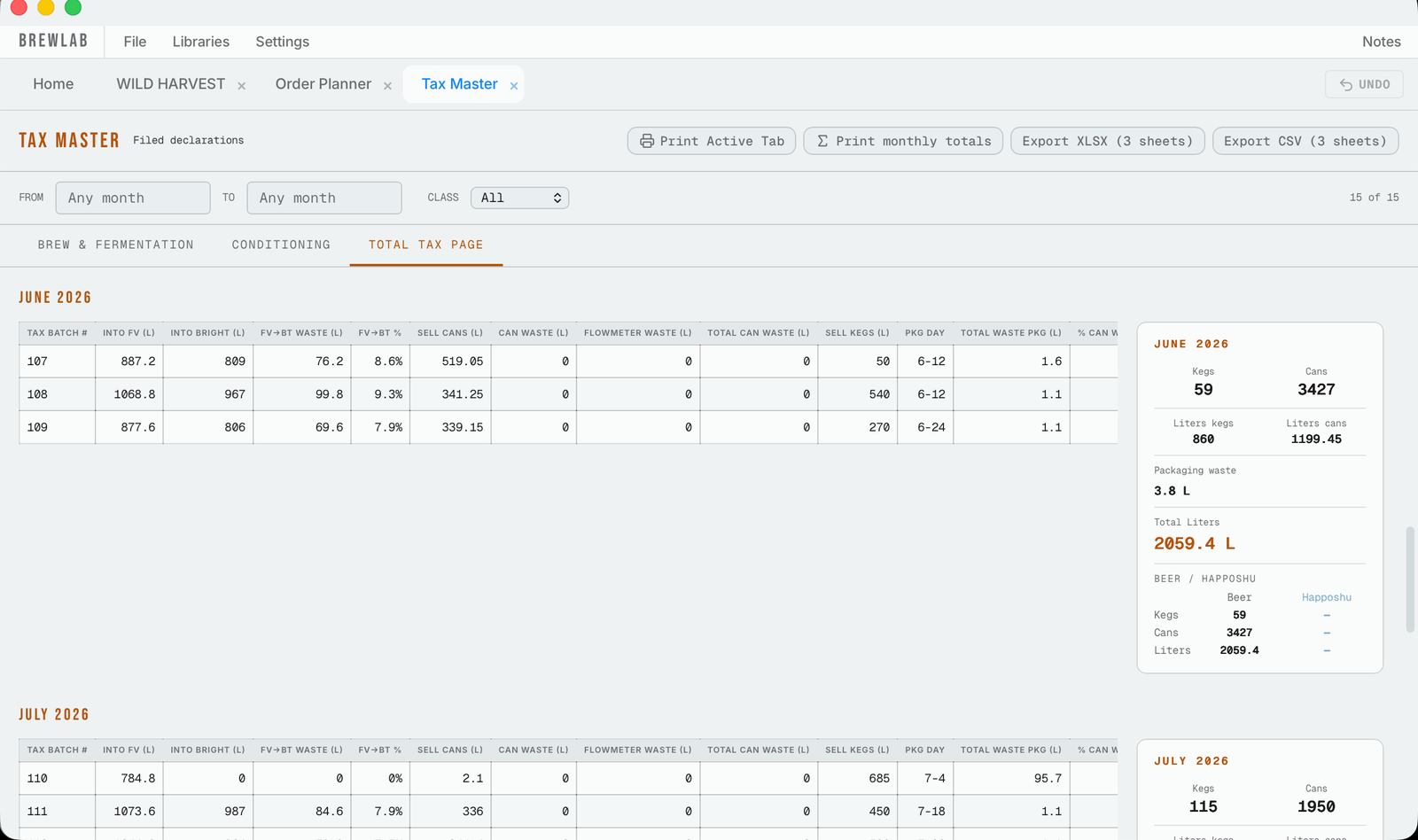
Tax records
- Brew day, fermentation and packaging fill in each beer's tax record.
- Tells you what's still blank.
- A tax summary laid out the way the tax office prefers, to print and export.
- Tax Master keeps every beer together, with monthly totals and totals for your own tax year.
Malt tariff quota
- Plan the year's malt from your templates, your recipes or the yearly planner.
- Record your reservations with each supplier; deliveries count against them from the day the malt is received.
- Unused quota carries forward: what you reserved last year and never took keeps counting this year.
- What you've actually used comes from your inventory records, not from the recipes.
- The malt supply and demand form (需給表) filled in for you, ready to print.
- Every figure on it can be typed over — past months and the opening stock too — without changing your inventory.
HACCP
- Opening and closing lists, and the weekly check-off.
- Records for any month, printed when the inspector asks.
- Canning bacteria tests and ATP swabs, with charts.
- Your HACCP plan, printed with today's date.
Backups and history
- One button backs up last month's tax paperwork to your computer.
- Every change records who made it.
On the brew floor, on your phone
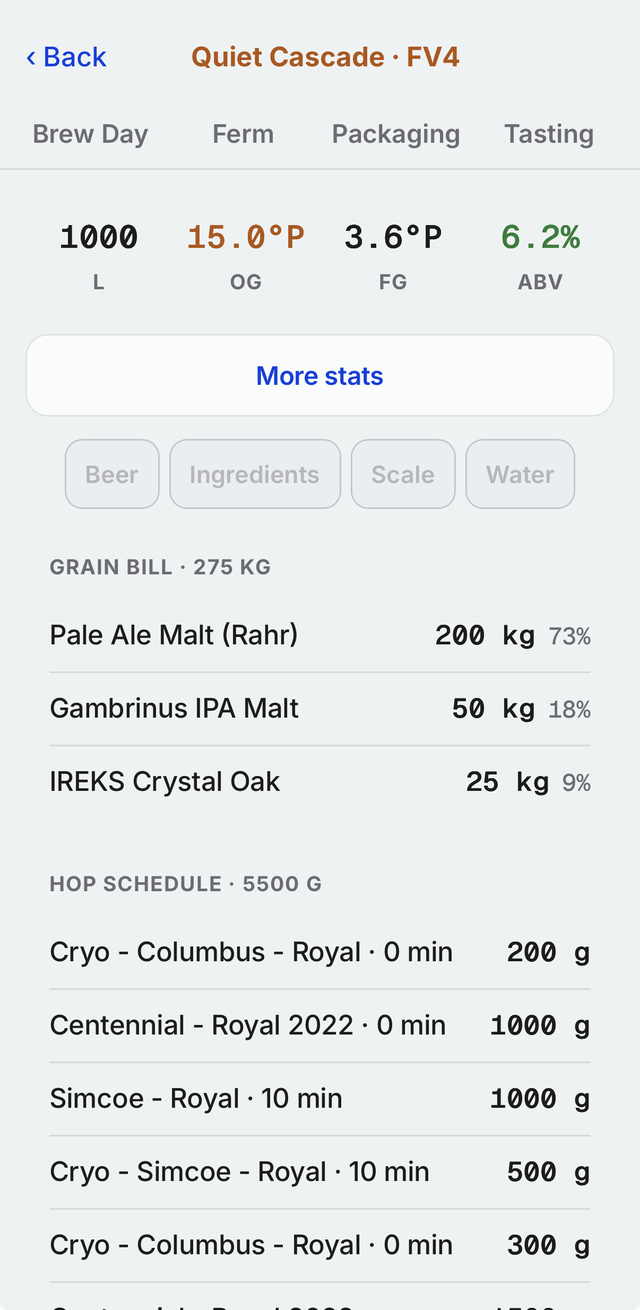
On the phone
- Brew day, fermentation, packaging and tasting, logged at the tank.
- Make and edit a recipe.
- Opening and closing lists, and your tasks page.
- Receive deliveries and take inventory.
- Beer ideas, written down wherever you are.
A shared tablet
- Sign the wall tablet in once; each person taps their name and types their PIN.
- Stay signed in for 10 minutes, an hour, or a whole brew day.
- On a tablet it's the full app, exactly as on the computer.
Your way
- English or Japanese, dark or light.
- °P or SG, EBC or SRM, vols or g/L.
- Keeps working offline, and sends your changes when you're back.
Complete the set.
Two apps that connect to Hakkotome. They use the same sign-in, the same people and the same task board.
Sell the beer you brew.
Everything the sales team does, connected to the brewery: releases, merch, events, the people you sell to, and the trips to see them.
Home
- An overview of everything coming up: tasks due, beer releases, events and planned merch.
- A calendar tied to every other part of the brewery.
Your tasks
- Everything each person needs to get done, on one list.
- Jobs from the brewery and the Sales Hub, together.
- Add your own personal tasks.
Releases
- Two clicks fill out half the release page and the emails, so you're not typing again what's already been recorded.
- A release planner that pulls in all of the beer's data from the brewery, tastings included.
- Shares the beer's price with the sales team.
- Shows every ingredient.
- Decide how much goes to the taproom, how much to B2C, and how much is saved for events.
- Spider graphs of each beer's flavor profile, drawn automatically from the group tastings.
- A folder for each beer, made automatically in the cloud so anyone on the team can reach it, for all its pictures and assets.
- A sales sheet built from those assets with stylish templates, saving the sales team hours on every release. Or make your own templates.
- A release email made for you from templates, the same way.
- Beer notes and descriptions written by the sales team, synced to each beer's release page.
- Every job for a release can be assigned, so the sales manager sees exactly who is doing what.
Merch
- A year-long calendar to plan merch ahead, organized by merch line and by type: t-shirts, hoodies, button-ups, glassware.
- Plan orders and track their status.
- Alerts months ahead, so you're ready for the coming season.
- Keeps your suppliers' names and phone numbers, and your past orders.
- Reminders that repeat every year, so nothing gets forgotten.
- Works out prices and profit margins.
- Assign the jobs.
- A folder for each product in the cloud, with all its assets and details.
Events
- Every event coming up, the ones you've been invited to and are still deciding on, and when they are, with the calendar built in.
- An archive of past events, to see how each one went and whether next year's is worth doing.
- An overview: what the event costs, which staff are going, and how many volunteers you need and have.
- A packing list made automatically from the beer you're bringing and the serving equipment you have, with a backup list, so you never forget anything again.
- A list of what you're selling (kegs, merch, apparel) that tracks what you took and what came back.
- Works out the cost per person for hotels, train tickets and everything else.
- Puts it all together: the total cost, and the profit the event made.
- Notes on the new contacts you made there.
- A list of the documents you need: sales sheets, cards, everything.
- The money day by day: starting cash, finishing cash, what you made each day, and notes.
- Events are kept as a series, so each event's page shows every past year: what you had to do, what sold well, and what to do next time. Every little note is remembered.
Tasks
- A page for the manager to make sure every job coming up has someone on it.
- A review page showing who did each job.
- Delegating is easy, and nothing falls through the cracks.
CRM
- A CRM that isn't stuffy like the traditional ones. It's about the people.
- What each person likes, where you met them, and the personal touches.
- Each person is connected to the bar or shop where they work.
- Notes on each bar as a whole, and on the people who work there.
- Scan a business card and the contact fills itself in, with AI text recognition.
Sales trips
- A trip planner that builds a trip from your customer list, where you're going, and how much time and distance you have.
- Notes before and after, links and saved documents for each bar you'll visit, so every visit is personal to that bar.
- The CRM connected to the trip sheet.
- A map with the best route between the places.
- A calendar reminder of when and where you're going.
- A printable list of everything on the trip.
Meetings
- A meeting page connected to all the other apps, for more productive meetings in less time.
- Every past meeting and what was discussed, kept.
- Search, filters and meeting recaps.
- Every person has their own section, for their own area of the brewery.
Notes and calendars
- Jot something down and come back to it later.
- Publish calendars for your team.
Where the team talks.
A communication tool that ends endless message threads, confusing email chains and conversations scattered everywhere. Built like Microsoft Teams or Slack, but more useful, and made for a brewery.
Topics, projects and chats
- Topics hold projects. For example, a Suppliers topic can have one project for cans, one for chemicals and one for boxes.
- Each project has as many chats as it needs, so everything stays together instead of spread across emails.
- Each project has its plan built in: a Gantt chart of what needs doing by when, assignable tasks, key dates and files, with the chats underneath.
Plan
- One combined plan: everything happening in the brewery at once, every brew date and due date side by side.
Discuss any page
- Take any page (a brew, a release, a beer's schedule), bring it into the Team Hub, and start a discussion right under it.
- Link tasks from there: assign people and see when it's done.
ASAP, your tasks and mentions
- ASAP: the most important tasks, in their own section.
- Your tasks page is the same in all three apps, synced and linked, so you see everything you need to do from any app.
- Mentions: everywhere you've been mentioned, so you never miss one.
Meetings
- Brings the brewery's and the sales team's meetings together into one group meeting that covers only what the whole group needs, so meetings are shorter and more efficient.
Messages
- Private direct messages and group chats.
- Photos and files attached right in the chat.
- Translate any message between Japanese and English, for the foreign brewers on a multicultural team.
Archive
- Finished projects are put away, not deleted.
One brewery, three apps.
Everywhere
- Built for the desktop, with the most important information on your phone too.
- One sign-in signs you into all three apps.
Everything it does.
The full list, area by area.
If you don't see the book you want to read on the shelf, write it.
I've brewed in Japan for years, and the whole time I've been searching for one tool that could build recipes, keep track of my tax data and inventory, handle the malt tariff reduction paperwork, and submit recipes to the tax office, quickly, in one easy package. Some days it feels like most of my job is filling out the documents we're required to file.
I found good programs for making recipes, but none of them had the details I wanted: dip hop temperature adjustments, dry hops set to go in at a certain Plato, and every version of a recipe with the changes I made along the way. My tax paperwork was Excel files I filled in by hand, every day.
So I spent the last year putting it all together: writing the book I wanted to read, and putting it on the shelf for everyone to use.
We brew beer.
We built this because we needed it.
Hakkotome started as the tool our own brewery runs on. It was written by a head brewer who got tired of whiteboards and spreadsheets, and it's still shaped every week by what happens on the brew floor.
Free to start.
Use it a little and it costs nothing. You only pay if you use it a lot.
Email coming soon