Tax Master
15.1Open it
Tax Master is where every beer you've recorded (see Tax records for the beer) is kept together, so you can look back over your taxes and print them.
On Home, click Tax master. Every beer you've made is laid out in three tabs:
- Brew & Fermentation
- Conditioning: usually bright tank transfers and the like.
- Total Tax Page: an overview of each beer.
The beers are listed in order of tax batch number.
15.2Choose what you see
- From and To: the months you want to look at. Clicking From or To opens a calendar to pick the month from.
- Class: Beer, Happoshu or All.
It's mostly self-explanatory. Use it to double-check that everything has been recorded and nothing is missing.
15.3The Total Tax Page
The Total Tax Page is wide. Use the scroll bar along the bottom to scroll left and right and see all of it.
It has more than the tax office usually asks for. It's for you too: what percentage of your canning was waste, what percentage of your packaging was waste, and so on.
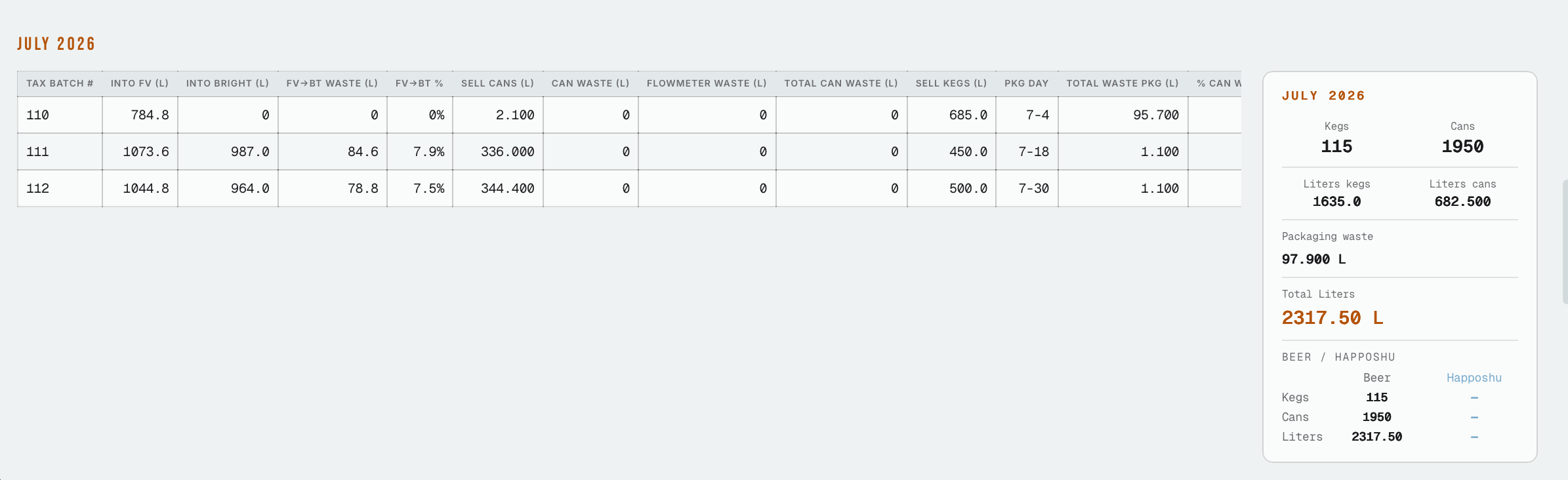
It's grouped by month. Each month has a table of that month's beers, and next to it, on the right, a box with the month's totals:
- Kegs and Cans: how many you filled
- Liters kegs and Liters cans: how many liters went into them
- Packaging waste
- Total liters
- Beer / Happoshu: the kegs, cans and liters of each
These monthly totals are the ones that matter for your taxes.
A Totals button adds up the months you chose, for example September 2025 to August 2026 (your own tax year), so you see the year's total beer, happoshu, liters, cans and kegs. Print monthly totals prints each month's figures with the total of all of them at the bottom.
15.4Print and export
At the top:
- Print Active Tab prints the tab you're looking at. The Total Tax Page prints on its side with every column fitting on the page.
- Export XLSX (3 sheets) downloads all three tabs in one Excel file, one sheet per tab. Export CSV (3 sheets) writes the same three, as a zip of three .csv files.
To dig deeper, export it. In Excel you can see everything, and work out things like your average canning waste and your average packaging waste.
Example: export the year, open the Total Tax Page sheet, and average the packaging-waste column to see how much you lose per batch. The export's numbers and percentages are real numbers, so Excel can average them.